Home > > Basic digital planner 2027
Skip to product information
1 of 16

Basic digital planner 2027

Basic digital planner 2027

Regular price $23.00 CAD
Regular price Sale price $23.00 CAD
Sale Sold out

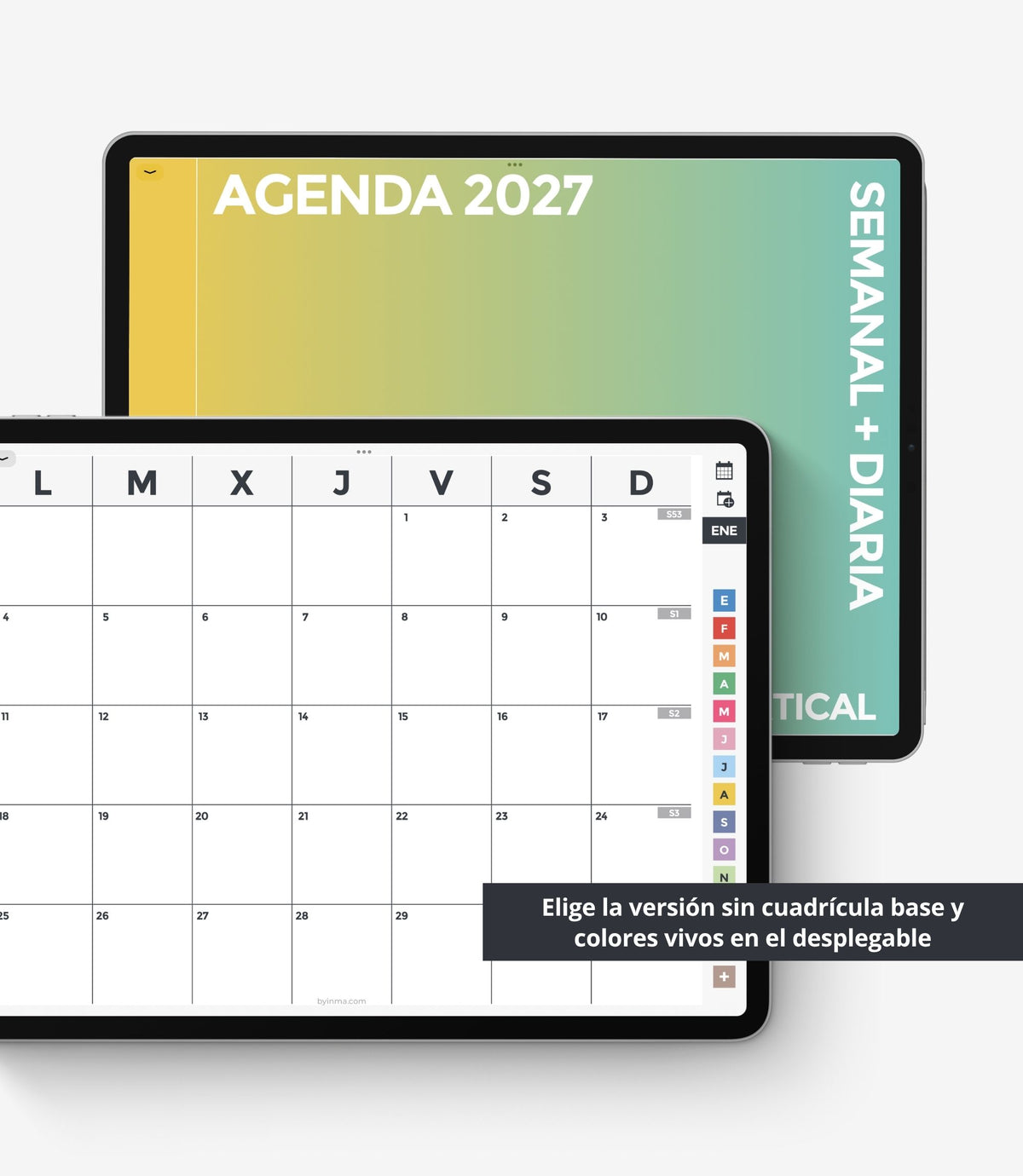
If you are overwhelmed by digital planners with hundreds of extra templates you don't usually use, I have created this basic planner. It has only the most common planning pages: an annual planner, monthly calendar, and weekly and daily pages. 

The only additional templates included in this planner are a habit tracker and a blank page for each month that you can use for extra notes, a vision board, reflections on the month, or anything else you need.

In addition, this planner is designed to be more accessible to people with visual impairments, as it features thicker, darker lines and larger text.

Choose the design with a grid if you want a guide to help you write and draw in the planner, or choose the design without a grid if you want complete freedom.

View full details

Let's get into the nitty gritty details.

CONTENT

❖ PAGES: 461
❖ DATES: January 2027 - December 2027.
❖ DATED PAGES: Calendar, yearly, monthly, weekly, and daily (only the weekly version is also included)
❖ WEEK START: Monday

❖ DESIGN VERSIONS: 5 (see images)

❖ EXTRA MONTHLY PAGES: Habit tracker and blank page.
❖ MATCHING STICKERS:
- Sticker album + Elements file for GoodNotes
- Sticker file for Noteful
- PNG files for any note-taking app

❖ iOS SHORTCUTS APP INTEGRATION: This planner includes a shortcut on all pages to add events to Google Calendar, Apple Calendar, or the Reminders app. This integration only works with Apple devices, as it is done through the Shortcuts app (it is important to read the included instructions, as you need to install the included Shortcut). The rest of the planner works perfectly with any operating system if you have a note-taking app as specified below. You just won't be able to use this integration.

☛ IMPORTANT: This type of digital planner does not allow automatic synchronization with Google Calendar, Apple Calendar, or Reminders. The shortcuts allow you to open this app without leaving the planner, but you will have to write the event in these apps independently. If you do not want to use this feature, ignore that this link exists and use it as usual.

FILES INCLUDED IN THIS PURCHASE

‣ 1 PDF with links to download all the files and tips to start digital planning

WHAT DO YOU NEED TO USE THIS PLANNER?

  • An iPad, tablet, or computer. If you want to use it ONLY on your phone write me first so I can send you a sample.
  • A note-taking app that supports PDF with hyperlinks and allows to write on them.
  • An Apple Pencil or stylus if you use an iPad or tablet is highly recommended to enjoy the best experience.

COMPATIBLE NOTE APPS AND DEVICES

To use BY INMA digital planners, you’ll need a note-taking app that lets you import PDFs with hyperlinks and write on them. You’ll find many in your device’s app store, and new options are constantly being released.

If you don’t want to take a chance or don’t have time to try out several, I recommend checking out Goodnotes, Noteful, or Noteshelf if you use Apple; Samsung Notes, Penly or Noteshelf if you use Android; or Xodo if you use Windows.

These apps are not included with the purchase of the planner; they must be purchased separately. 

HOW TO DOWNLOAD THE FILES

After purchase the download link will automatically become available on the thank you page. The link will automatically be sent to your email inbox as well. Please check your spam folder to ensure the download has not been filtered in there. If you still cannot find it, contact me and I'll be happy to send you the files.

HOW TO OPEN ZIP FILES

Open a ZIP file on an iPad with a version of iOS 11 or later.

  1. Open the Files app, then find the ZIP file or archive from which you want to extract.
  2. Tap the ZIP file or archive.
  3. A folder is created containing the files. To change its name, touch and hold on the folder, then tap Rename.

If you have an older model you will probably need an external application to decompress these files. In this case, don’t try to download and open your ZIP files onto a smartphone or a tablet, please, use your computer. 

Open a ZIP file on a computer

Just double-click on it. With some types of computers, you may need specific software to open it. There's lots of free zip software, you can try iZip for Mac or the free version of WinRAR for PC.

If you have problems to open ZIP files in Windows

Some versions of Windows may cause errors when unzipping ZIP files occasionally. If this happens to you, try one of these things:

  1. Rename the file and then try to extract its content.
  2. Maybe the file location is protected so move the file and then try again. You can move the Zip file to one of your user profile folders, such as Documents, and then try to extract the files.
  3. Re-download the files again to see if it was a problem downloading them that was not downloaded correctly. Sometimes Chrome gives problems with Etsy downloads. Try to download it using another browser to see if it can be related to this.
  4. If all else fails, use a free third-party file compression software and use it to extract the contents of the zip file.

RETURNS

All the products you can find in this shop are digital items for instant download so no refund is possible as the item cannot be returned and remains the property of the buyer. But please contact me if you have any problems with your order. I will be happy to help you in any way I can.

COPYRIGHT

All designs in this shop are for private use. Its sale, reproduction, reinterpretation, diffusion, distribution (free or paid), and use for commercial purposes are totally prohibited. All of them are protected by copyright laws.

  • Goodnotes 5

  • Noteful

  • Noteshelf

  • Notability

  • Xodo

  • ZoomNotes

1 of 6
  • 5 stars: 20 (95%)
  • 4 stars: 1 (5%)
  • 3 stars: 0 (0%)
  • 2 stars: 0 (0%)
  • 1 star: 0 (0%)
J
José
Es justo lo que buscaba

Este año quería probar una agenda sin tantísimas opciones , en los últimos años me he dado cuenta que al final no le sacaba provecho en su totalidad , creo que con este modelo más sencillo lo he acertado .
Y como siempre , el diseño de las agendas están hechos con mucho acierto .

O
Olga
La mejor agenda para organizarte…

Es la agenda más práctica para organización que puedas adquirir, puedes planear tu año fácilmente, metas, finanzas, compras, proyectos, llevar tu propio control. No se van arrepentir de adquirirla, su diseño es muy bonito. Totalmente recomendable.

J
JOSE
La mejor

La compré el 2023 y repito el 2024, sencilla y práctica, simplemente la mejor.

M
M

¡Fabuloso! En español, simple y claro, y se puede elegir la semana como prefieras. En mi caso, yo prefiero la horizontal, y el único problema que le veo es que el mes no cubre toda la hoja... preferiría que la plantilla mensual fuera igual que en la semana vertical, o que se pudiera elegir - pero no es tan importante. Los días no los uso, de manera que no opino. Pero me encanta que NO traiga millones de plantillas que no se usan en realidad - siempre se pueden añadir las que se necesiten en los "cuadernos" de notas.

M
Mel

Me encanta la agenda, es muy completa y su diseño es precioso. Todas las pegatinas son preciosas y fáciles de utilizar, al estar recortadas previamente. Es muy fàcil, también, de descargar y de utilizar en apps de notas como la que tengo, en mi caso Penly. A demás la atención al comprador es excelente, muy amable y comprensiva. Recomiendo 100% tanto la tienda como sus agendas y demás.

C
Cristina

Estupendo, funciona maravilloso. Lo uso con GoodNotes. La única pena es que incluye l agenda de 2022, un ya no es muy útil.

L
Luisa

Es espectacular la agenda ya la comencé a usar y súper bien ando interactuando mucho con ella 💜🩵

u
ugaldeaguilar1

muy practica y bonita lo recomiendo

M
María

La vendedora es encantadora, respondió super rápido, me envió tutoriales, la agenda es una pasada. La recomiendo totalmente

S
Sara

Contacté con ella para saber mas de la agenda y fue super rapida y amable

J
Judith

Cumplió con mis expectativas. Me encantó.

B
Billye

I've had it for about a month now and it's awesome!

Κ
Κωνσταντίνα

Beautiful but most of all quickly responsive , easy going to one to another date through hyperlinked dates and QUICK updated to all devices !!

C
Cynthia

Such a nicely laid out planner, with gorgeous colors - very happy!

H
Holly

Amazing I use this everyday, Keeps me very organised!

d
deisiwilliamson

Love it! Super happy I decided on this planner for the year, very pleasing and helps keep me organized

K
Kelly

Absolutely wonderful! Beautiful planner, lots of stickers, great customer service 😊

N
Nivedita

Thanks for this great planner! I have been using it to keep track of my university work and extracurriculars, and it has been great! I love this planner! I have been using it in Notability (instead of Goodnotes) and it works great there! Inma is very helpful with any questions you may have!

A
Ana

Es una agenda preciosa, justo lo que estaba buscando: elegante y funcional.

T
Txime

Es el producto que estaba buscando, una agenda digital con las mismas prestaciones que las de papel y en castellano. Inma es un encanto, me ha resuelto todas las dudas antes de la compra, incluso me grabó un video para que viera todas las prestaciones y estoy muy agradecida. También he tenido su ayuda después de instalarlo todo.
La agenda es genial, tiene de todo.
Seguiré pendiente de otros productos.
Concha

R
Raquel

Como agenda digital es estupenda, los enlaces entre semanas y meses facilitan muchísimo su utilización, permite duplicar las páginas que sean necesarias y estéticamente es preciosa! Además tenía una duda con las sticky notes e Inma me la ha respondido rápida y claramente.. recomiendo su compra sin duda.